


IKEA
4.73.08K Reviews
App Specs
- Version
- 5.8.0
- Updated On
- License
- Free
- Downloads
- 50,000,000+
- Developer
- Inter IKEA Systems B.V
- Categories
- Shopping
- Platform
- Android, iOS
Screenshots

 Analysis by AppCompare
When I use a retailer’s app, I’m not only thinking about how quickly I can find a chair or lamp. I also want to know what choices I’m making along the way: whether I need an account, what I can do without sharing location, and when the app asks me to use my camera. Those questions matter especially when shopping involves measuring a room, checking a nearby store, or saving ideas for later. My view of the IKEA app is practical: it can make planning and browsing easier, but it is worth using deliberately rather than tapping through every prompt by habit.
Trust starts with knowing what you are choosing
The app is a free shopping app from Inter IKEA Systems B.V, and it has a 4.7 average from around 250,000 ratings. It has been installed over 50 million times, which suggests that many shoppers use it, but popularity alone does not tell me how any particular person will feel about its requests or account options. I would treat those figures as context, not as a substitute for deciding what I am comfortable sharing.
For a casual browse, I would begin without making the app part of every stage of my shopping routine. Search for the item, compare the details, and only sign in if a feature you want actually calls for it. If you shop at IKEA often, an account may make saved lists and purchase history more useful. If you are only checking whether a particular shelf might suit a room, you may prefer to keep the session simple and decide later whether those conveniences are worth the extra setup.
Location and camera choices deserve a moment
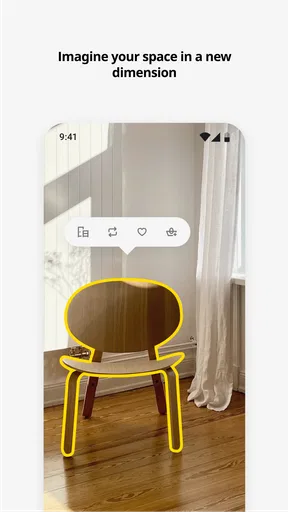
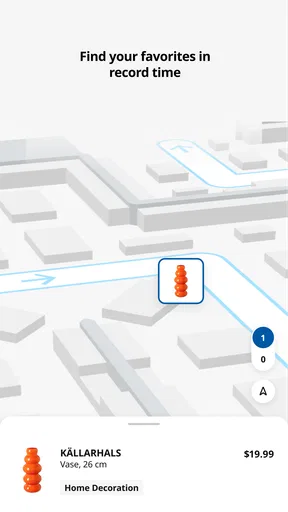
Two situations call for a little more attention than ordinary browsing. Finding a nearby store involves location, while the room-visualization tool uses the camera to place furniture in your space. Both are understandable requests for those jobs, but neither needs to be treated as an automatic yes. I would turn location on when I am actively planning a store visit, and use the camera feature when I am ready to test a specific piece rather than granting access just because the app opened.
That distinction is useful in everyday life. If I am at home comparing a bedside table, I can first check its details and think through the measurements I already know. If I decide a visual preview would help, I can then use the camera as part of that task. When I am out and trying to locate a shop, location has a clear purpose; when I am not, it is easier to leave that choice for another time. My rule is to connect each permission to a job I am doing right now, instead of treating access as the price of browsing.
Accounts, lists, and the value of restraint
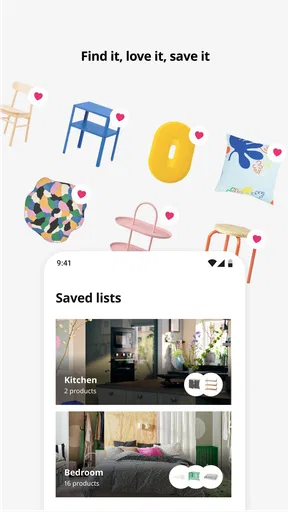
Account access is most useful when you expect to return to your plans. A list can help keep a room project together across several browsing sessions, and purchase history can be convenient when you need to revisit something you bought. The trade-off is that a one-off shopper may get little benefit from signing in. I would not create an account simply because a screen encourages me to do so; I would first ask whether I want saved shopping activity enough to make that step worthwhile.
I also try to keep browsing recommendations in perspective. Personal suggestions can make it easier to discover related home items, but they are not a neutral substitute for my own list or budget. When I have a particular need, I search for that need and compare the options rather than letting a feed set the direction of the visit. That small habit keeps inspiration from turning into an unplanned cart.
Worth Reading Before You Choose

Flipboard Shows What News Apps Must Do Beyond the Feed

Switching to Android Auto Means Rethinking Your Driving Routine

Google Calendar Makes a Crowded Week Easier to Manage

Ludo King Makes the Most of the Minutes Between Plans

Baby Panda World Brings Quick Play to Modern Phones, but Its Game Library Feels Busy

ESPN’s Live Game View Makes Following Close Games Easier
What the app can and cannot settle for you
A digital preview is helpful for judging the general look and placement of a furnishing, but I would still check the listed dimensions and measure the room before ordering. A screen can make an item feel as though it fits without answering practical questions such as whether there is enough clearance to open a drawer or walk past it. The app is strongest as a planning aid, not as a replacement for a tape measure or a careful check of the product details.
Availability information can also help narrow down a shopping plan, but I would use it as a reason to check before setting out, not as a guarantee that every part of a trip will go smoothly. For a larger purchase, it makes sense to review the item, the store option, and the order details together before committing. If I only need a quick, independent comparison across several retailers, a general shopping search may be a better first stop; IKEA’s app is more useful when I have already decided to explore IKEA’s own range.
Getting Started with the App
First things first, downloading the IKEA app is a breeze. Available on both Android and iOS, it’s a quick download and easy setup. Once you’re in, you’re greeted with a clean, minimalist interface that’s quite pleasing to the eye. It’s like the digital version of walking into an IKEA store, minus the labyrinthine layout.
Upon opening the app, you’re encouraged to log in or create an account. This helps keep track of your shopping lists and purchase history, making it a handy tool for frequent IKEA shoppers. You can also enable location services to find the nearest store, which is pretty useful if you’re planning a visit.
Exploring the Features
What I found most impressive is the app’s augmented reality (AR) feature. It allows you to visualize how a piece of furniture will look in your space before you buy it. You simply point your camera where you want the item to go, and the app does the rest. It’s a fantastic way to avoid those “Oops, it doesn’t fit” moments.
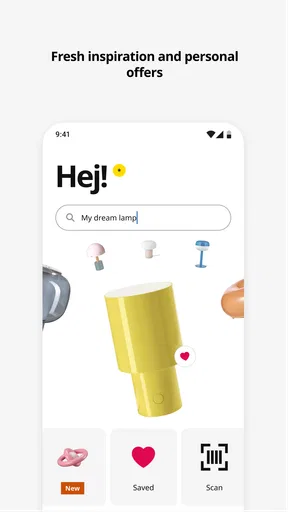
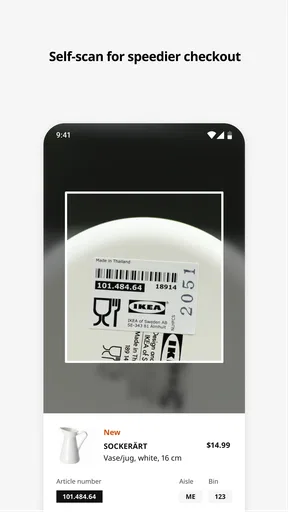
The search functionality is robust. You can search by product name, category, or even scan the barcode of an item in-store to get all the details instantly. This is super handy for impulsive planners like me who tend to forget dimensions and descriptions while shopping.
Shopping Experience
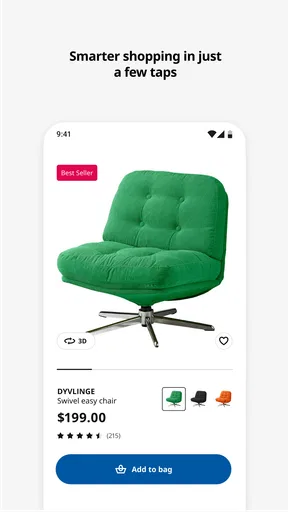
The shopping experience is seamless. You can add items to your cart with just a tap, and the app offers various payment options, including the ability to pay in installments. What’s more, you can check the availability of products at your nearest store, which is a real time-saver.
I also appreciated the customer reviews section. It provides insights into the quality and usability of products from real users, helping you make informed decisions. The app keeps everything well-organized so you can review your favorites, see what’s trending, and even get personalized recommendations based on your browsing history.
Keeping It Social
The IKEA app isn’t just about shopping; it’s also a place to find inspiration. The app includes a community section where users share their home setups and DIY projects. It’s like an Instagram feed dedicated to interior design, and it can be quite addictive if you’re into home decor.
Plus, the app regularly updates with the latest promotions and new arrivals, so you’re always in the loop about what’s fresh and exciting.
Planning a real shopping trip
One useful way to combine the app’s tools is to treat a room project as a sequence rather than a single browsing session. I would start by searching for the item or category, save the candidates I want to compare, and check their dimensions before using the visual preview. That order matters: it avoids spending time trying to place a product that is already too wide, too tall, or otherwise unsuitable for the space.
For example, if I am replacing a small entryway storage unit, I can measure the available wall space first, look through suitable IKEA options, and scan a product barcode while in store if I want to bring up its details without typing a name. Before leaving home, I would check the selected store’s availability and keep a short list of alternatives. That last step is easy to overlook, but it helps if my first choice is not available or looks different in person than I expected.
Where it beats a general shopping app—and where it does not
Compared with a broad marketplace app, this one is more focused: it brings IKEA’s catalogue, store planning, product information, and shopping tools together. That focus is an advantage when I want to compare IKEA furniture or continue a project across a visit and a later online session. A general retailer or price-comparison tool is better when the main question is whether another brand offers a similar item at a different price, because this app is not designed to present the whole market in one place.
It also cannot make every decision for me. Reviews can reveal how other buyers describe everyday use, but I still read them as individual experiences rather than a promise that an item will suit my home. I look for comments that relate to my specific concern—such as assembly, storage, or the way a finish looks—then weigh those alongside the product information. This is more useful than treating a high or low reaction as a complete verdict.
Small habits that make browsing more useful
If I am shopping in person, I use the barcode scanner as a quick bridge between the physical product and its app details. I would still note the product name or dimensions before walking away, especially if I am comparing several similar pieces. In a busy store, relying on memory is an easy way to mix up options; checking the information while I am standing near the item keeps the comparison grounded.
For a room plan, I would use saved favorites or a shopping list to separate “possible” items from the one I am ready to buy. That creates a simple pause between inspiration and checkout. It is particularly helpful when I am decorating with someone else: rather than sending a stream of product names, I can keep the shortlist together and review it with the other person before deciding. The app is more useful as a planning space when I use it to narrow choices, not merely collect them.
Who will get the most from it
I think the app suits regular IKEA shoppers, people furnishing a first home, and anyone who likes to research furniture before making a trip. The combination of search, product details, lists, store availability, and visual placement can reduce some of the back-and-forth between a room measurement, a store visit, and a final decision. It is also handy for someone who sees an item in a showroom and wants to check its information without trying to remember the label later.
On the other hand, I would skip it if I have no interest in IKEA’s range and just want a neutral comparison across brands. It is also not the right tool if I expect a digital room preview to prove that furniture will fit down a hallway, work with existing doors, or feel comfortable at home. Those questions still need real measurements and, where useful, an in-person look. The app can help me make a more informed shortlist; it cannot replace the parts of shopping that depend on my actual space and priorities.
For someone wondering whether an account is essential, I would start with the features I want: browsing and checking products are the natural first steps, while lists and purchase history make signing in more worthwhile if I plan to return. If I want to find a store, I can make the location choice when that becomes relevant. If I want to try room visualization, I can decide about camera access at that point. Keeping those choices tied to specific tasks makes the experience feel more manageable.
Final Thoughts
All in all, the IKEA app is a must-have for anyone who loves IKEA or is just looking to spruce up their living space. With its user-friendly interface, powerful AR feature, and a wealth of products at your fingertips, it’s like having an entire IKEA store in your pocket. Whether you’re a seasoned interior decorator or a newbie looking to upgrade your pad, this app has something for everyone.
So next time you’re thinking of a home makeover, give the IKEA app a go. You might just find that perfect piece you didn’t know you needed!
Pros
- User-friendly interface for easy navigation.
- Extensive product catalog with detailed info.
- Augmented reality feature for room planning.
- Seamless integration with IKEA Family account.
- Frequent updates with new products and features.
Cons
- Requires stable internet for optimal performance.
- Limited offline functionality.
- Some AR features may not work on older devices.
- Occasional slow loading times.
- Product availability varies by location.
FAQs for IKEA
What features does the IKEA app offer?
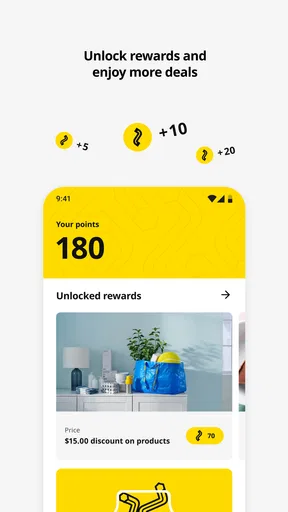
The IKEA app provides a range of features designed to enhance your shopping experience. You can browse the latest catalog, check product availability, and even visualize furniture in your home using augmented reality. Additionally, the app allows you to create shopping lists, find store details, and access exclusive offers.
Is the IKEA app free to download and use?
Yes, the IKEA app is completely free to download and use on both Android and iOS devices. There are no hidden fees or in-app purchases required to access its core features. However, purchasing products through the app will, of course, involve standard costs.
Can I make purchases directly through the IKEA app?
Absolutely. The IKEA app allows you to purchase items directly through your mobile device. You can browse products, add them to your cart, and complete your purchase using secure payment options. The app also provides order tracking and delivery updates for your convenience.
How accurate is the augmented reality feature in the IKEA app?
The augmented reality (AR) feature in the IKEA app is designed to be highly accurate, allowing users to visualize how furniture will fit and look in their actual living spaces. It uses advanced AR technology to ensure that product dimensions and appearances are as realistic as possible, though lighting and room conditions may affect results slightly.
Does the IKEA app offer customer support?
Yes, the IKEA app provides access to comprehensive customer support. You can find answers to common questions, get help with orders, and contact customer service directly through the app. Additionally, the app offers live chat and email support options to resolve any issues you may encounter.


